Early Access: Paraform Status

Ethan Huang
•
Strategy & Operations
April 23, 2026
April 23, 2026
Paraform Status is our way of recognizing the recruiters who consistently deliver. Your tier reflects your trailing 90-day performance across three metrics: earnings from placements, mid-round interview rate, and trust record — and it unlocks benefits reserved for top performers.
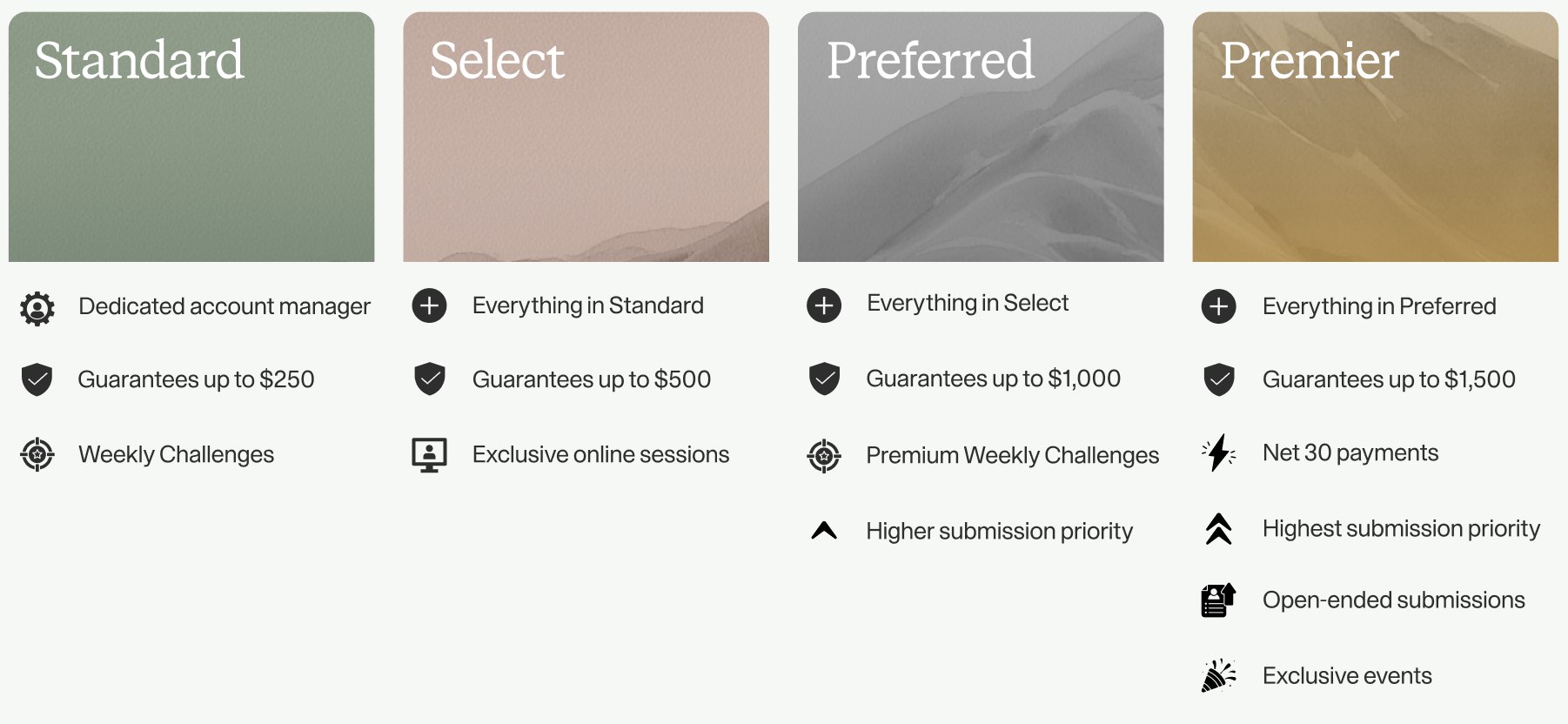
At Premier and Preferred, your submissions are shown higher in the queue that hiring managers review.
Premier recruiters are paid 30 days after a candidate’s start date, rather than on the standard payment schedule. Payments are still subject to the standard Replacement Policy.
Under qualifying conditions, Paraform will provide compensation of up to the maximum in your Status as a way to acknowledge your work.
Challenges are time-limited performance bonuses. Completing specific activity goals within the challenge window earns you a bonus payout. Premium Challenges at Preferred and above have higher payouts than standard Challenges.
Your status is based on three metrics measured over the past 3 calendar months:
Evaluations happen on the 1st of every calendar month. Your assessment period is always the three full calendar months prior to that evaluation date. For example, if the next evaluation is May 1, your assessment period is Feb 1 - Apr 30.
On the Status page in your Paraform account. It shows your current tier, assessment period, and live metrics for earnings, mid-round rate, and trust. The thresholds for each tier can be found in your Early Access email.
If your trailing 90-day metrics meet the thresholds for a higher tier on the 1st of the month, you'll be promoted automatically.
You'll enter a one-month Grace Period rather than being demoted immediately. During that month, if your metrics recover to meet your current tier's thresholds, you keep your status. If they don't, your Status will drop by one tier.
Trust measures how many Trust & Safety incidents have been associated with your account. Incidents typically stem from client feedback about submission quality, conduct, or platform misuse. If you receive a report, your account manager will be in touch to share exact details.
Trust reports are counted only when a Paraform team member has confirmed the legitimacy of the incident. You will receive an email with details of each incident when they count toward your Trust metric.
Note that for every 100 submissions you make, one incident is removed from your count. For example, if you have 3 incidents and 250 submissions, your Trust metric would read as 1 report.
If your adjusted report count exceeds the limit for your tier, you won't qualify for that tier regardless of your earnings or mid-round rate.
Possibly. You have early access to the Status Program, and we'll be iterating based on feedback. Your tier assignment reflects your current performance - if anything changes to benefits or qualifying thresholds, you'll be notified.
Please reach out to ethan@paraform.com - we'd love to hear from you!